
Từ 15.800 ₫
Nếu bạn đang học digital art và luôn bối rối không biết nên dùng cọ nào để đi nét, cọ nào để tô màu, cọ nào để blend da, cọ nào để tạo texture hay cọ nào để vẽ kiểu thick paint có chất hơn, Bộ 160 Brush Procreate Và Photoshop Vẽ Anime là một bộ tài nguyên rất đáng để thêm vào thư viện luyện vẽ. Đây là set brush được xây dựng xoay quanh quy trình vẽ nhân vật 2D/anime, từ phác thảo, clean line, tô base, lên sáng tối, phun chuyển sắc, tạo texture cho đến hoàn thiện tranh.
Không giống các bộ brush chỉ thiên về một hiệu ứng riêng lẻ, bộ này có tính ứng dụng rộng hơn nhiều. Bạn có thể dùng nó để vẽ chân dung anime, fanart, OC, nhân vật fantasy, tranh minh họa dễ thương, avatar mạng xã hội, sticker, poster nhân vật hoặc các bài luyện vẽ màu cơ bản. Với 160 mẫu cọ khác nhau, bộ brush này phù hợp cho cả người mới đang tập quy trình vẽ lẫn artist đã có kinh nghiệm muốn có thêm lựa chọn khi xử lý line, màu và texture.
Điểm mạnh lớn nhất của bộ cọ nằm ở sự đa dạng theo từng công đoạn vẽ. Khi bắt đầu một bức tranh digital art, bạn thường cần cọ line để phác bố cục và dựng hình. Sau đó cần cọ đi nét sạch hoặc hơi thô tùy phong cách. Khi chuyển sang tô màu, bạn lại cần cọ phủ mảng, cọ mềm để blend, cọ hạt để tạo chất liệu, airbrush để tạo chuyển sắc và một số cọ dày hơn để nhấn lại cảm giác painterly. Bộ 160 brush này gom gần như đầy đủ các nhóm đó vào cùng một set, giúp workflow liền mạch hơn.
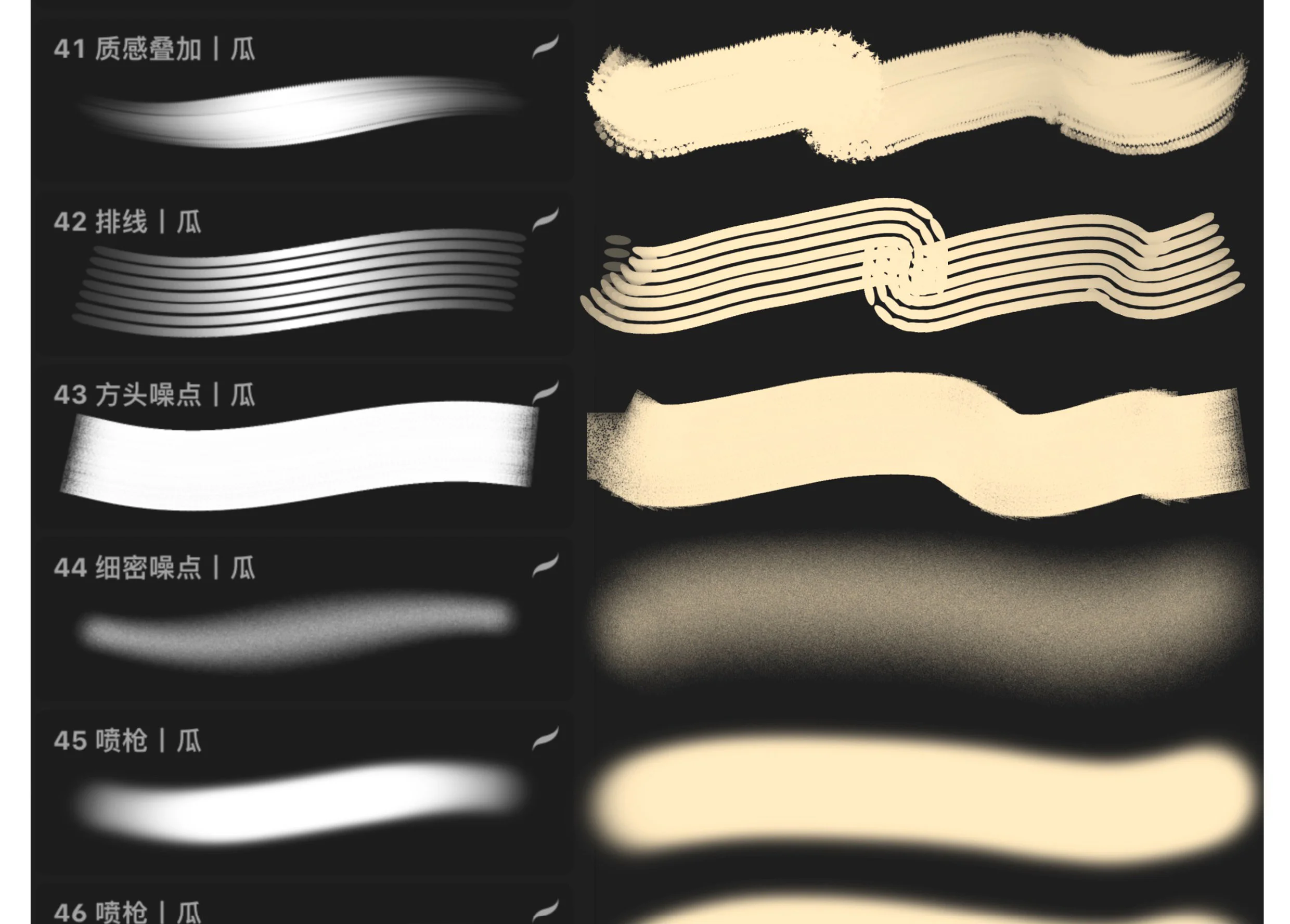
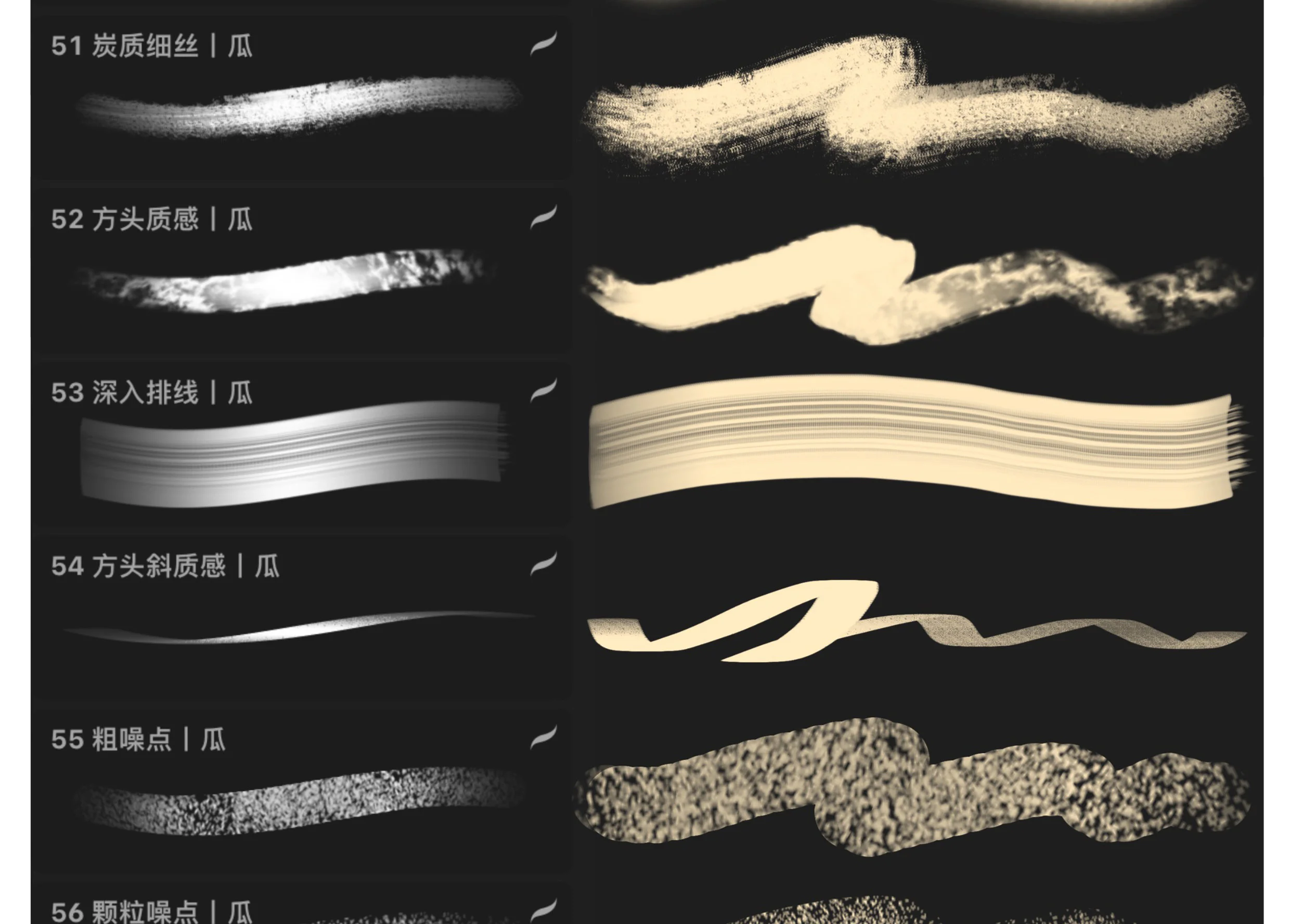
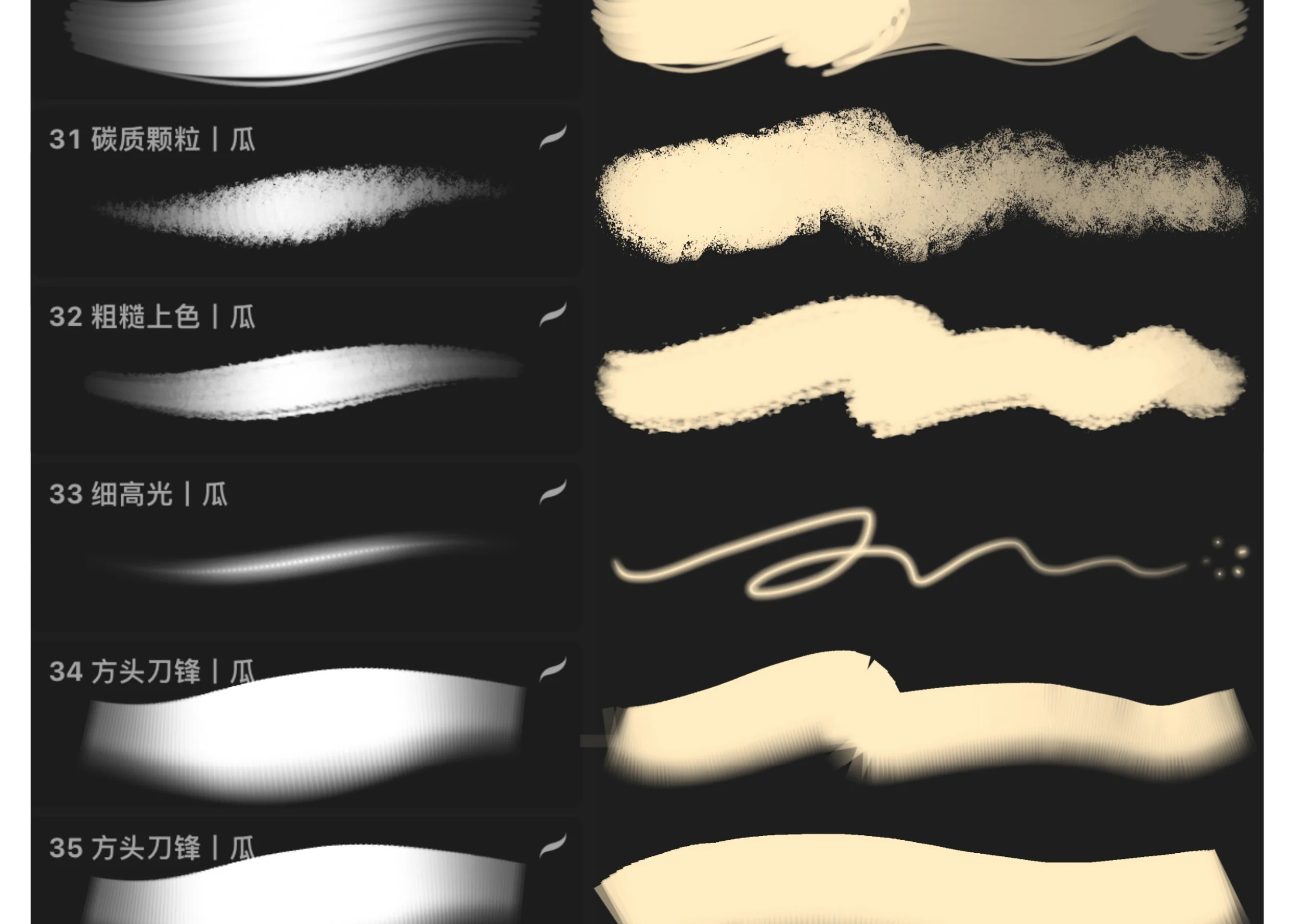
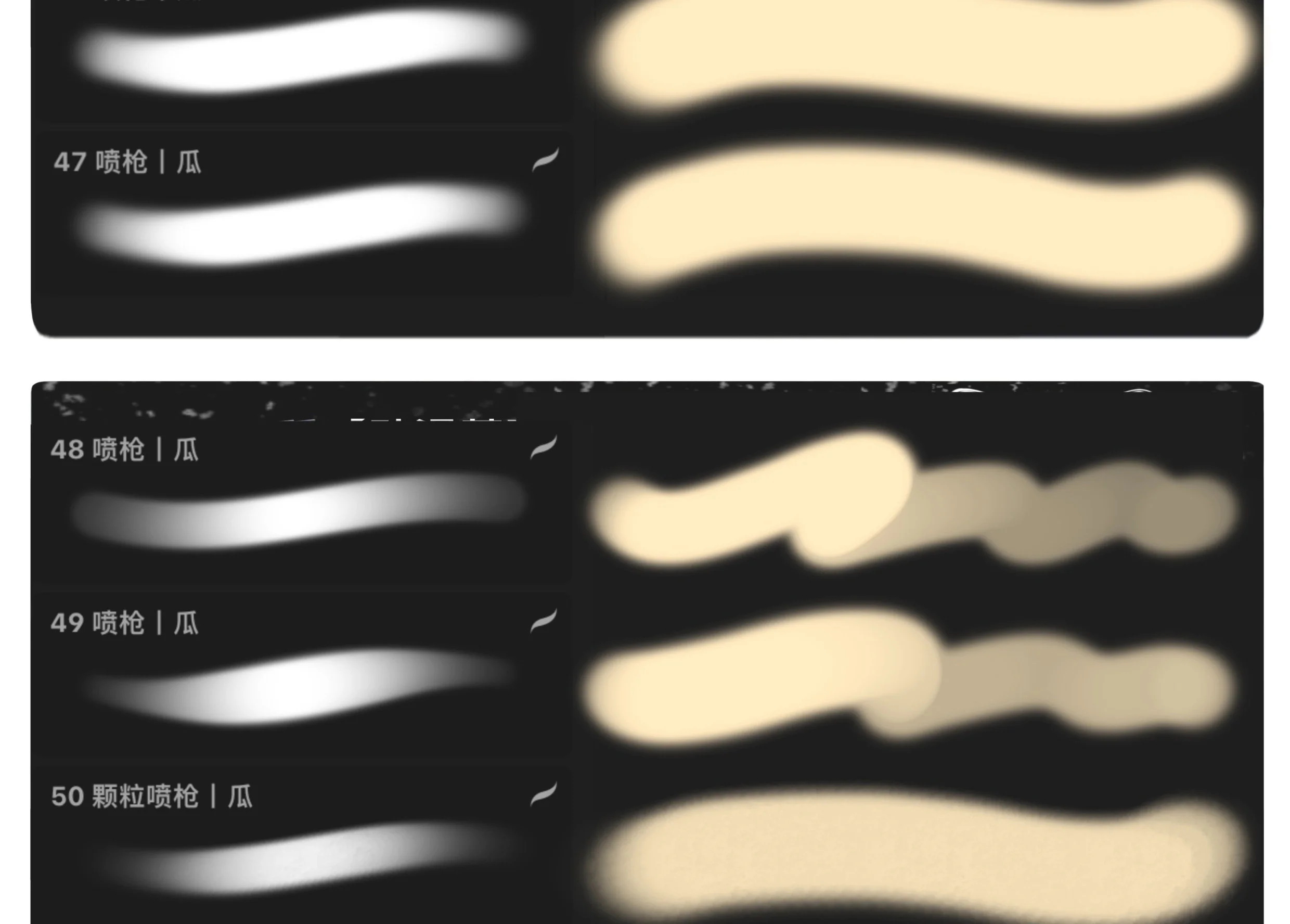
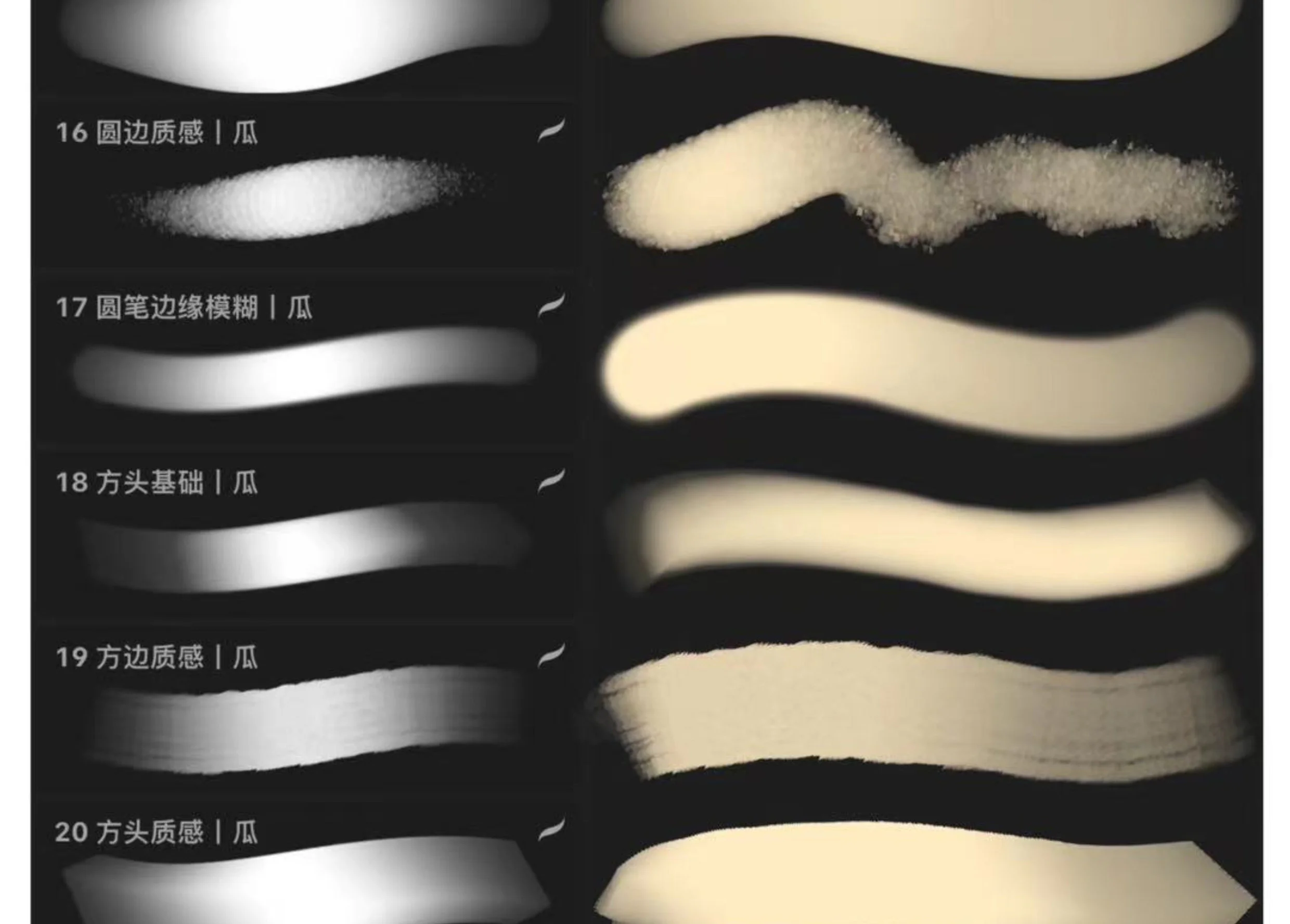
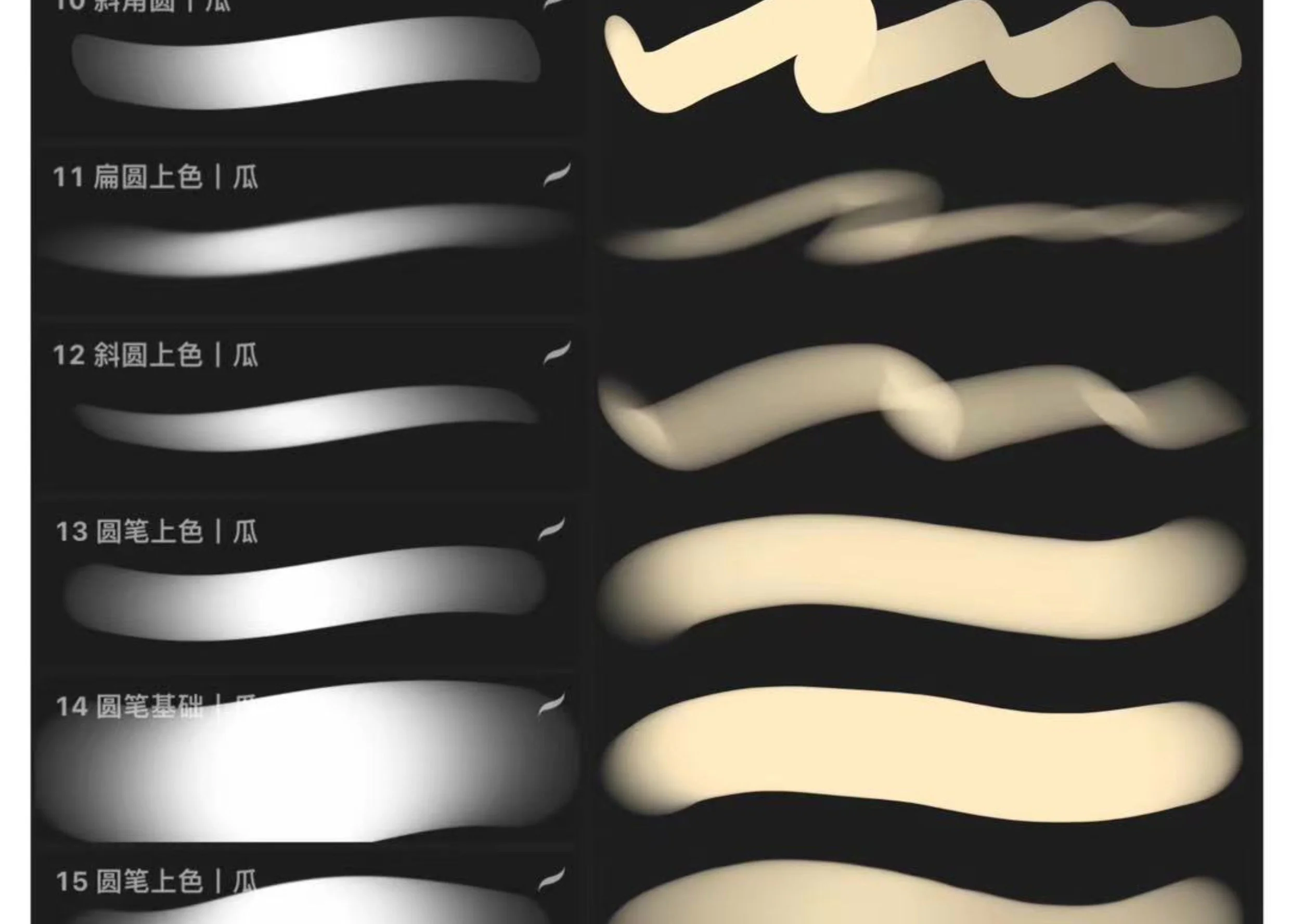
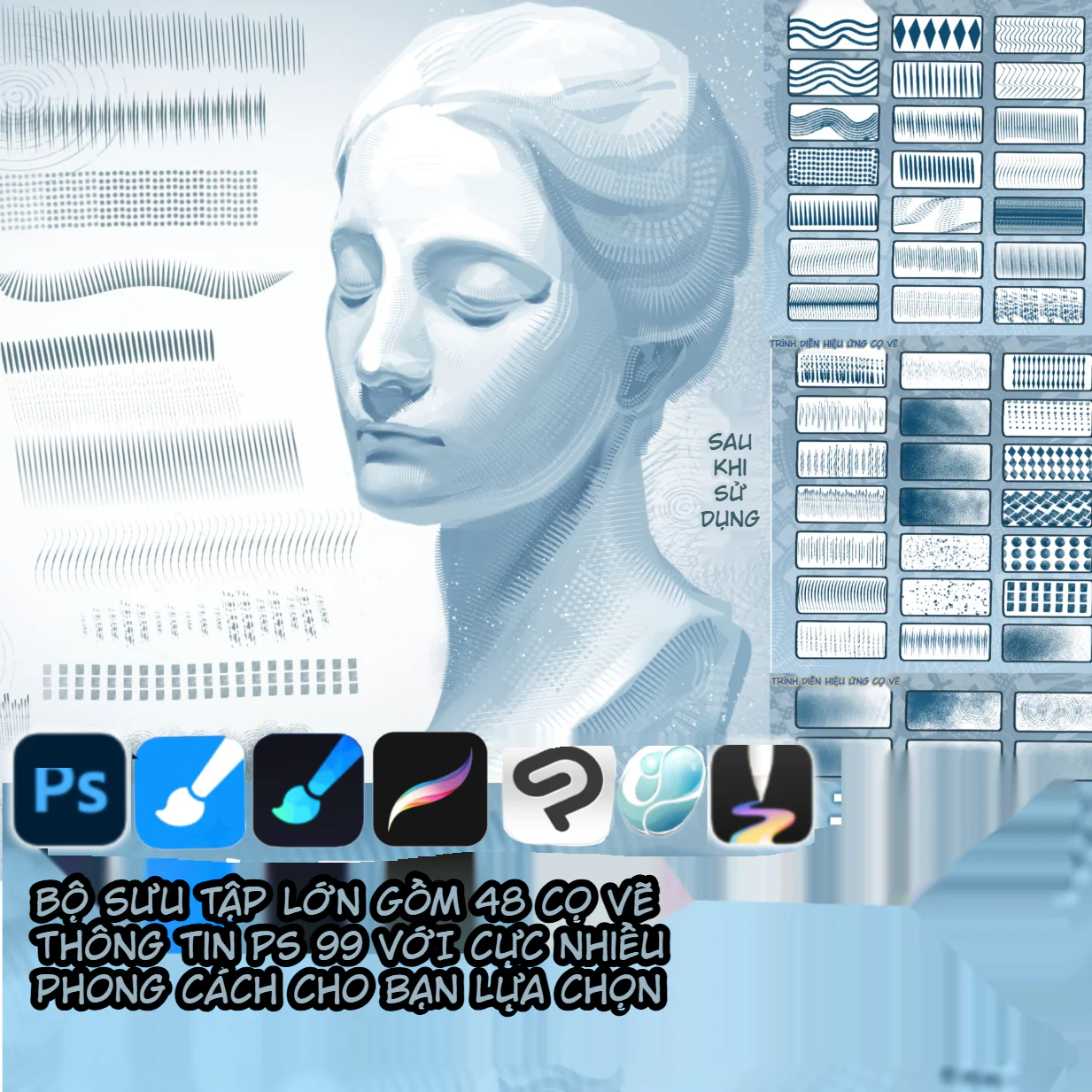
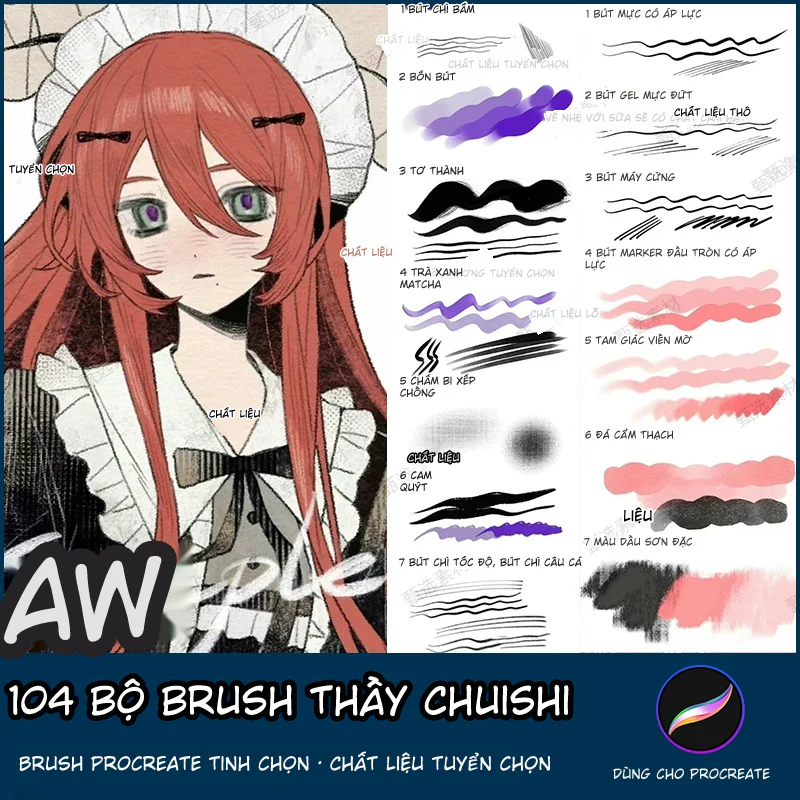
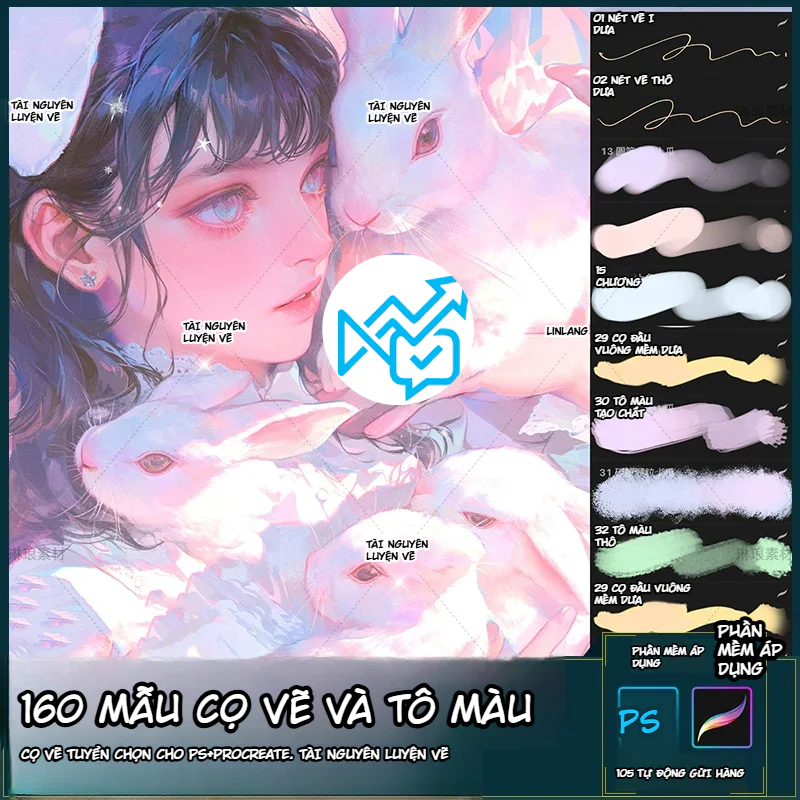
Trong ảnh preview, có thể thấy bộ cọ gồm nhiều nhóm như cọ đi nét mảnh, cọ line thô, cọ đầu tròn mềm, cọ đầu tròn cứng, cọ đầu vuông, cọ tô màu tạo chất, cọ hạt, cọ carbon, cọ airbrush, cọ thick paint và cọ texture. Những nhóm này đều rất cần thiết trong vẽ anime và minh họa nhân vật. Đặc biệt với người mới, việc có sẵn nhiều lựa chọn cọ giúp dễ thử nghiệm hơn, từ đó nhanh tìm được cảm giác nét phù hợp với tay mình.
Bộ brush cũng được giới thiệu là dùng cho Photoshop và Procreate. Đây là hai phần mềm phổ biến trong cộng đồng digital artist: Photoshop mạnh về chỉnh sửa, layer, brush preset và workflow máy tính, còn Procreate là ứng dụng vẽ trên iPad được thiết kế cho sáng tạo kỹ thuật số. NextGZ hiện cũng có danh mục tài nguyên digital art và brush cho nhiều phần mềm vẽ như Procreate, Photoshop, Clip Studio Paint, nên bộ này phù hợp để đặt trong nhóm tài nguyên luyện vẽ hoặc brush vẽ anime trên website.
Bộ brush này phù hợp nhất với người đang học vẽ nhân vật anime, semi-real, minh họa 2D hoặc digital painting cơ bản. Nếu bạn thường gặp tình trạng nét vẽ thiếu tự nhiên, tô màu bị phẳng, da nhân vật bị bệt, tóc thiếu texture, quần áo không có chất liệu hoặc tranh thiếu cảm giác hoàn thiện, bộ cọ này có thể giúp bạn thử nhiều cách xử lý khác nhau mà không phải tự mò từng thông số brush từ đầu.
Với người mới, đây có thể xem như một bộ “cọ luyện tập tổng hợp”. Bạn có thể dùng cọ line để luyện nét, dùng cọ tô mềm để luyện mảng màu, dùng airbrush để luyện chuyển sắc, dùng cọ texture để học cách phá bề mặt, và dùng cọ thick paint để tập nhấn khối. Với artist đã quen tay, bộ này hữu ích như một bộ brush phụ để tăng tốc quá trình phác, tô, chỉnh mép và hoàn thiện tranh.
Bộ cọ cũng rất hợp với các bạn làm nội dung mạng xã hội, vẽ fanart, nhận commission, thiết kế avatar, vẽ minh họa cho bài đăng hoặc xây dựng portfolio digital art. Khi cần hoàn thành tranh nhanh nhưng vẫn giữ được cảm giác nét và chất liệu, một bộ brush đa năng như thế này sẽ tiết kiệm khá nhiều thời gian.
Nhóm đầu tiên là brush đi nét và lineart. Đây là nhóm cọ dùng để phác thảo, dựng form, clean line, vẽ tóc, mắt, miệng, nếp áo và các chi tiết nhỏ. Trong ảnh preview có nhiều nét line khác nhau: có nét mảnh mềm, nét thô, nét hơi carbon, nét trơn, nét có độ nhấn đầu cuối. Với tranh anime, lineart không chỉ là đường bao, mà còn quyết định độ mềm của nhân vật. Một nét line quá cứng có thể khiến tranh bị khô, còn nét quá mờ lại làm hình thiếu lực. Nhóm brush này giúp người dùng thử nhiều cảm giác nét để tìm phong cách phù hợp.
Nhóm thứ hai là brush tô màu cơ bản. Đây là nhóm cọ dùng để phủ base, tô da, tóc, mắt, trang phục và background đơn giản. Các cọ tròn mềm, tròn cứng, đầu vuông, đầu dẹt và cọ có mép chuyển sắc đều phục vụ cho bước này. Với người học vẽ, đây là nhóm cọ rất quan trọng vì phần màu nền nếu bị lem, bẩn hoặc thiếu kiểm soát sẽ ảnh hưởng toàn bộ các bước sau.
Nhóm thứ ba là brush airbrush và chuyển sắc mềm. Những cọ này phù hợp để phun màu má, ánh sáng nhẹ, bóng đổ mềm, glow, ánh sáng môi trường hoặc các vùng cần chuyển sắc mượt. Khi vẽ da anime, airbrush thường được dùng để tạo độ hồng ở má, mũi, tai, môi hoặc vùng phản quang. Tuy nhiên, cần dùng vừa phải vì nếu phun quá nhiều, tranh dễ bị mờ và mất cấu trúc.
Nhóm thứ tư là brush texture và cọ tạo chất. Đây là nhóm giúp tranh bớt phẳng. Các cọ hạt, carbon, bề mặt thô, cọ mép xước, cọ có noise hoặc vệt painterly có thể dùng để nhấn tóc, vải, nền, bóng đổ hoặc các mảng màu cần cảm giác chất liệu. Trong digital painting, texture là yếu tố giúp tranh thoát khỏi cảm giác “mịn nhựa”, đặc biệt khi vẽ theo phong cách semi-real hoặc anime painterly.
Nhóm thứ năm là brush thick paint. Đây là nhóm cọ có cảm giác nét dày, rõ vệt, phù hợp để nhấn khối, chồng màu và tạo cảm giác vẽ tay hơn. Khi dùng đúng cách, thick paint giúp tranh có lực hơn, nhất là ở vùng tóc, quần áo, phụ kiện hoặc background. Với các bạn đang muốn chuyển từ tô màu phẳng sang phong cách painterly hơn, nhóm cọ này rất đáng thử.
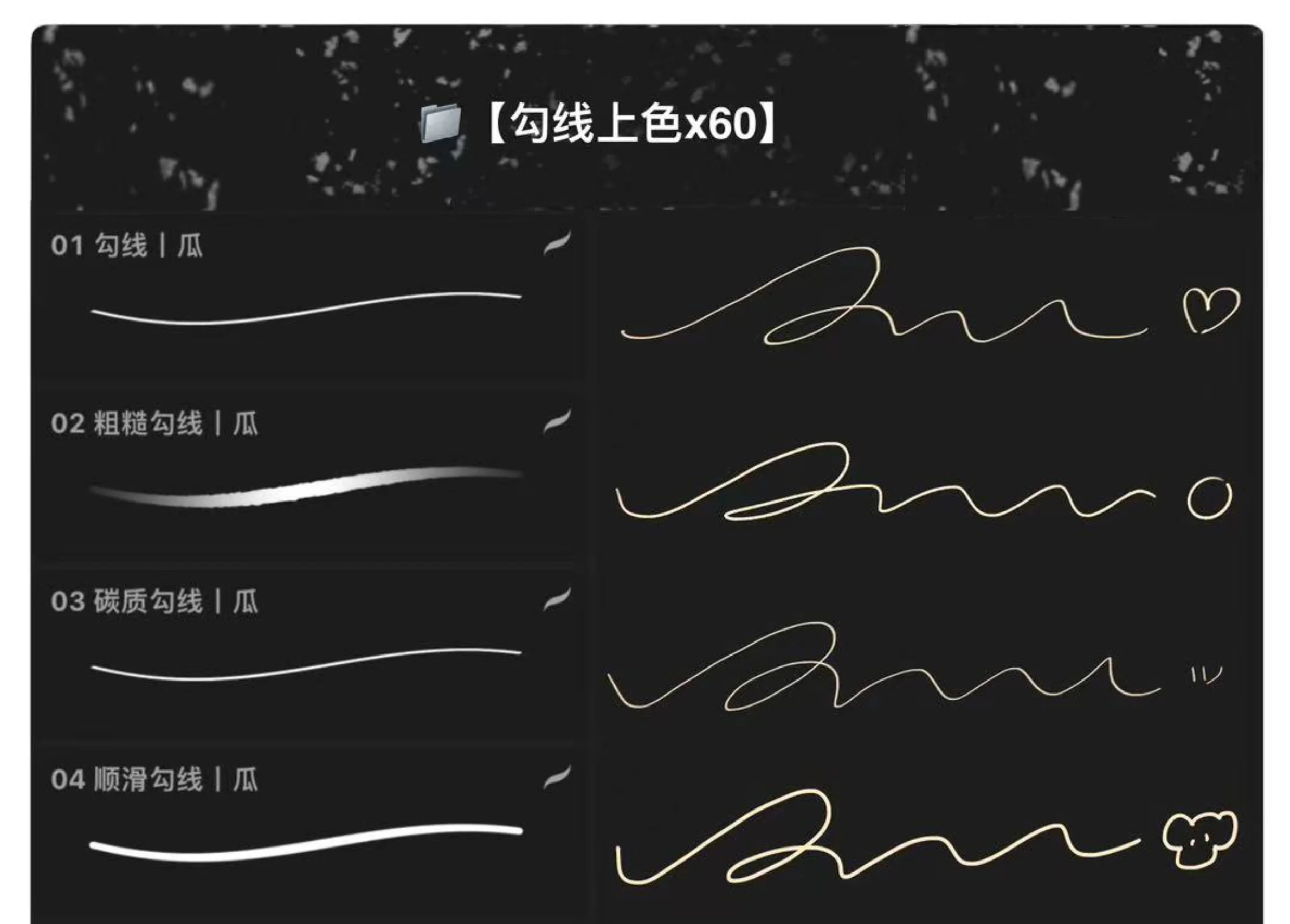
Khi vẽ một nhân vật anime, bạn có thể bắt đầu bằng brush line mềm để phác dáng và gương mặt. Sau đó dùng một cọ line sạch hơn để đi nét chính, nhưng vẫn giữ một số vùng nét thô ở tóc hoặc áo để tranh không bị quá máy móc. Sau khi có line, dùng brush tô màu cơ bản để phủ base cho da, tóc, mắt và trang phục. Ở bước này nên tách layer rõ ràng để dễ chỉnh màu.
Khi chuyển sang ánh sáng và bóng đổ, bạn có thể dùng cọ mềm hoặc airbrush để dựng chuyển sắc lớn trước, sau đó dùng cọ mép cứng hơn để nhấn các vùng cần rõ khối như mí mắt, sống mũi, cổ, tóc và nếp áo. Nếu tranh bị quá mịn, dùng cọ texture ở opacity thấp để thêm bề mặt. Cuối cùng, dùng brush highlight hoặc cọ thick paint để nhấn điểm sáng ở mắt, tóc, môi, phụ kiện và vùng ánh sáng chính.
Với tranh chân dung như ảnh demo cô gái và thỏ trắng, bộ brush này có thể hỗ trợ rất tốt ở các vùng như tóc xanh tím, mắt long lanh, da hồng mềm, lông thỏ trắng, ánh sáng hồng xanh và các vệt highlight nhỏ. Đặc biệt, nhóm airbrush và cọ hạt rất hợp để tạo cảm giác ánh sáng mơ màng, dịu, có không khí.
Nhiều bạn mới học digital art thường tải rất nhiều brush hiệu ứng đẹp mắt nhưng lại thiếu nhóm cọ nền tảng. Kết quả là khi vẽ thật, tranh có thể nhiều hiệu ứng nhưng thiếu form, thiếu line chắc, thiếu mảng màu sạch và thiếu quy trình. Một bộ brush luyện vẽ như thế này quan trọng vì nó phục vụ trực tiếp cho các bước cơ bản nhất: đi nét, tô màu, dựng sáng tối, tạo texture và hoàn thiện.
Brush tốt không thay thế kỹ năng, nhưng giúp người học tập trung vào đúng vấn đề hơn. Khi có cọ line ổn, bạn dễ luyện nét. Khi có cọ tô màu ổn, bạn dễ kiểm soát mảng. Khi có cọ airbrush và texture, bạn dễ hiểu cách chuyển sắc và tạo chất liệu. Khi có cọ thick paint, bạn bắt đầu cảm nhận được lực nét và cách chồng màu. Vì vậy, bộ 160 cọ này nên được xem là một bộ công cụ luyện vẽ, không chỉ là một bộ tài nguyên trang trí.
Khi mới tải bộ brush về, bạn không nên dùng cùng lúc quá nhiều cọ. Hãy chọn khoảng 5 đến 7 cọ chính cho một bức tranh: một cọ sketch, một cọ line, một cọ tô base, một cọ mềm để blend, một cọ texture, một cọ airbrush và một cọ highlight. Sau khi quen tay, bạn có thể mở rộng thêm các cọ khác theo nhu cầu.
Với Procreate, nên thử từng brush ở nhiều kích thước canvas khác nhau vì cảm giác nét có thể thay đổi theo độ phân giải. Với Photoshop, nếu bộ có file ABR, bạn có thể nhập brush qua bảng Brushes hoặc dùng tùy chọn Import Brushes theo hướng dẫn của Adobe. Nếu bộ có cả định dạng cho Procreate, hãy nhập đúng file brush hoặc brush set theo hướng dẫn nhập brush của Procreate để tránh lỗi không nhận file.
Trong quá trình vẽ, nên đặt các hiệu ứng airbrush, texture và highlight trên layer riêng để dễ chỉnh opacity. Đừng lạm dụng airbrush vì tranh sẽ dễ bị mờ và thiếu khối. Đừng dùng texture phủ toàn bộ vì hình sẽ bị bẩn. Cách tốt nhất là dùng brush theo đúng vai trò: line để kiểm soát hình, tô màu để dựng mảng, airbrush để làm mềm, texture để tạo chất, thick paint để nhấn lực.
Dù cùng một bộ brush được giới thiệu cho Photoshop và Procreate, cảm giác nét giữa hai phần mềm có thể khác nhau do engine cọ, áp lực bút, texture, stabilizer và cách xử lý blend không hoàn toàn giống nhau. Vì vậy, nếu bạn dùng song song iPad và máy tính, nên test brush trước khi đưa vào tranh chính. Một cọ rất đẹp trong Photoshop có thể cần chỉnh lại streamline, opacity hoặc pressure khi dùng trong Procreate, và ngược lại.
Nếu đăng sản phẩm trên NextGZ, phần mô tả nên ghi rõ phần mềm áp dụng: Photoshop + Procreate, nhưng phần định dạng file nên để theo bộ tải thực tế, ví dụ .abr, .brushset hoặc các định dạng đi kèm nếu có. Điều này giúp người dùng hiểu đúng trước khi tải và hạn chế nhầm lẫn khi cài đặt.
Tên sản phẩm: Bộ 160 Brush Procreate Và Photoshop Vẽ Anime, Đi Nét, Tô Màu, Airbrush, Thick Paint
Số lượng: 160 mẫu cọ
Phần mềm áp dụng: Photoshop, Procreate
Phong cách: Anime, 2D, semi-real, minh họa nhân vật, luyện vẽ digital art
Nhóm cọ chính: Đi nét, lineart, tô màu, airbrush, thick paint, texture, cọ đầu tròn, cọ đầu vuông, cọ hạt, cọ viền mềm cứng
Ứng dụng: Vẽ nhân vật anime, chân dung, fanart, OC, avatar, sticker, minh họa thỏ/cute, tô da, vẽ tóc, blend màu, dựng sáng tối, hoàn thiện tranh
Phù hợp cho: Người mới học digital art, illustrator, artist vẽ anime, người luyện Procreate, người dùng Photoshop, creator làm tranh mạng xã hội
Nền tảng đăng tải: nextgz.net
Bộ 160 Brush Procreate Và Photoshop Vẽ Anime là một set cọ rất phù hợp cho người học digital art muốn có một bộ công cụ đầy đủ để luyện từ cơ bản đến hoàn thiện tranh. Bộ này không chỉ có cọ line hay cọ tô màu đơn lẻ, mà bao gồm nhiều nhóm phục vụ toàn bộ workflow: sketch, lineart, tô base, airbrush, texture, thick paint, viền nét và nhấn chi tiết. Với tranh anime, fanart, OC, chân dung semi-real hoặc minh họa dễ thương, đây là một bộ brush có tính ứng dụng rất cao.
Nếu bạn đang gặp vấn đề tranh bị phẳng, nét thiếu lực, màu bị bệt hoặc chưa biết chọn cọ nào cho từng bước, bộ brush này là lựa chọn đáng thử. Dùng đúng cách, nó sẽ giúp quá trình vẽ gọn hơn, màu sạch hơn, nét linh hoạt hơn và tranh có cảm giác hoàn thiện hơn ngay từ các bài luyện đầu tiên.
Bộ 160 brush này dùng để làm gì?
Bộ brush này dùng để vẽ anime, đi nét, tô màu, airbrush, thick paint, tạo texture, dựng sáng tối và hoàn thiện tranh digital art trên Photoshop hoặc Procreate.
Brush này có dùng được cho Procreate không?
Có, theo ảnh sản phẩm bộ cọ hỗ trợ Procreate. Khi tải về, bạn nên nhập đúng file dành cho Procreate, thường là brush hoặc brush set, tùy gói tài nguyên thực tế.
Brush này có dùng được cho Photoshop không?
Có, ảnh sản phẩm ghi rõ bộ cọ dùng cho Photoshop. Nếu có file ABR, Photoshop có thể nhập brush qua bảng Brushes hoặc tùy chọn Import Brushes.
Người mới học vẽ anime có nên dùng bộ brush này không?
Có. Bộ này rất hợp với người mới vì bao gồm nhiều nhóm cọ nền tảng như cọ đi nét, cọ tô màu, cọ mềm, cọ texture và cọ airbrush, giúp luyện quy trình vẽ rõ ràng hơn.
Bộ brush này có dùng để vẽ thick paint không?
Có. Trong bộ có nhiều cọ tạo chất, cọ đầu vuông, cọ mép xước và cọ thick paint giúp tạo cảm giác nét dày, có lực và có bề mặt hơn.
Airbrush trong bộ này dùng để làm gì?
Airbrush dùng để phun màu mềm, tạo chuyển sắc, má hồng, ánh sáng nhẹ, bóng đổ mềm, glow và hiệu ứng không khí trong tranh.
Brush đi nét có phù hợp để vẽ lineart anime không?
Có. Bộ này có nhiều cọ line khác nhau, từ nét mảnh, nét thô, nét trơn đến nét có texture, phù hợp để phác thảo và clean line cho nhân vật anime.
Có thể dùng bộ brush này để vẽ tóc và mắt không?
Có. Cọ line và cọ texture phù hợp để vẽ tóc, còn cọ mềm, airbrush và highlight có thể dùng để tô mắt, tạo ánh sáng và độ trong cho nhân vật.
Có nên dùng toàn bộ 160 cọ trong một bức tranh không?
Không nên. Tốt nhất chỉ nên chọn một nhóm cọ chính cho từng tranh để workflow ổn định. Dùng quá nhiều cọ cùng lúc có thể làm tranh thiếu đồng nhất.
Browse more resources in the same collections.
Từ 15.800 ₫
PayPal checkout supports PayPal balance and eligible international cards.
 PayPal balance
Discord cộng đồng Digital Art
Real ratings from NextGZ members
画世界Pro: Mẹo làm màu phong phú hơn bằng Exclusion, Hard Mix và Saturation
Bộ brush Procreate cho anime & chibi: lineart, semi-thick, block màu và tỉa chi tiết
Tên gọi các loại tất theo độ dài: từ Foot Cover đến Thigh-High – tài liệu tham khảo khi vẽ nhân vật
Cách tô màu đầu gối tròn láng, mềm mại: Xương bánh chè, bóng cơ, Multiply và Highlight
Bình luận
0 bình luận
Đăng nhập để tham gia thảo luận cùng cộng đồng!
Đăng nhập ngayĐang tải bình luận...