Chinese for Digital Artists: 101 Krita Terms for Layer, Brush, Mask, and Blend Mode
Learn 101 Chinese terms for digital artists in Krita: layers, masks, brushes, blend modes, selections, transforms, colors, and practical file handover sentence patterns.
1:04 ước tính · Chưa có giọng vi-VN
When using drawing software in Chinese, the hardest part is not memorizing individual Chinese characters but recognizing the correct phrases within the context of the action. A digital artist may already understand layer, brush, mask, blend mode, selection, and transform very well in English, but still falls behind the pace when the interface switches to Chinese or when watching tutorials on Bilibili, Xiaohongshu, and Douyin. This article builds a system of over 100 Chinese terms specifically for artists, creators, and digital designers, using Krita as the reference interface because the software's layer, brush, mask, color, and transform systems are close enough to Photoshop, Clip Studio Paint, ibisPaint, and many other drawing tools.
The goal of this article is not to turn you into a software translator. The goal is to help you see 图层 and immediately react with "layer," see 混合模式 and know it's blend mode, or hear a Chinese creator say 锁定透明度 without having to pause the video to look up each character. The learning method is organized by workflow clusters: interface, layer–mask, brush, color, selection–transform, and file operations. Each cluster includes a table of Chinese characters, pinyin, Vietnamese meaning, recognition sentence, dialogue examples, and practice exercises.
To learn effectively, you should open Krita alongside, keep a simple test file open, and perform exactly the actions mentioned. When your brain simultaneously sees the characters, hears the pinyin, and touches the corresponding tool, the term will be remembered as an action rather than a discrete vocabulary entry. This is also a learning method suited to creative professionals who remember images, interface positions, and workflows better than memorizing lists.
Why should artists learn Chinese through action clusters?
In digital painting tutorials, instructors rarely read out individual nouns. They often speak in action sequences like "新建一个图层,然后把混合模式改成相乘", meaning create a new layer then change the blend mode to Multiply. If you only learn "图层 = layer" and "相乘 = Multiply" without being familiar with action sentence patterns, you'll still waste time piecing meanings together. Therefore, this article always places terms within real command sentences.
There are three rules for fast reading. First, words ending in 工具 are usually tools, such as 填充工具 being Fill Tool and 变形工具 being Transform Tool. Second, words ending in 图层 are a type of layer, like 颜料图层, 矢量图层, and 填充图层. Third, words ending in 蒙版 are masks, like 透明度蒙版 or 滤镜蒙版. By simply recognizing the suffix, you can already guess the functional group before understanding the entire phrase.
In technical Chinese, many words are direct descriptions of behavior. 不透明度 literally means "level of not transparent," i.e., opacity. 继承透明度 means "inherit transparency," corresponding to Inherit Alpha. 向下合并 means "merge downward," corresponding to Merge Down. Once you understand this structure, you don't need to memorize mechanically but can reason from familiar components.
Interface and navigation group
This is the first group to learn because it helps you understand where the instructor is pointing on screen. 界面 is the entire interface; 画布 is the canvas area; 面板 are the function panels like Layers, Brush Presets, or Tool Options. When you hear "打开图层面板," you just need to understand it as opening the Layers panel. When you hear "隐藏所有面板,进入画布独占模式," they mean hiding the panels to switch to Canvas-only Mode.
Two verbs commonly paired with the interface are 打开, meaning open, and 关闭, meaning close. Creators also use 显示 and 隐藏 to say show or hide. The sentence pattern "在设置菜单里显示笔刷预设面板" can naturally be translated as "In the Settings menu, enable the Brush Presets panel." Note: the character 画 in 画布 and 画笔 both relate to drawing, so they are easy to recognize in videos.
| Chinese | Pinyin | Meaning in workflow | Recognition sentence |
|---|---|---|---|
| 界面 | jièmiàn | interface | 在 Krita 里找到"界面"。 |
| 画布 | huàbù | canvas | 在 Krita 里找到"画布"。 |
| 面板 | miànbǎn | panel/docker | 在 Krita 里找到"面板"。 |
| 工具栏 | gōngjùlán | toolbar | 在 Krita 里找到"工具栏"。 |
| 工具选项 | gōngjù xuǎnxiàng | tool options | 在 Krita 里找到"工具选项"。 |
| 导航器 | dǎohángqì | Navigator | 在 Krita 里找到"导航器"。 |
| 弹出面板 | tánchū miànbǎn | pop-up panel | 在 Krita 里找到"弹出面板"。 |
| 画布独占模式 | huàbù dúzhàn móshì | canvas-only mode | 在 Krita 里找到"画布独占模式"。 |
| 放大 | fàngdà | zoom in | 在 Krita 里找到"放大"。 |
| 缩小 | suōxiǎo | zoom out | 在 Krita 里找到"缩小"。 |
| 旋转画布 | xuánzhuǎn huàbù | rotate canvas | 在 Krita 里找到"旋转画布"。 |
| 镜像画布 | jìngxiàng huàbù | mirror canvas | 在 Krita 里找到"镜像画布"。 |
Layer and mask group
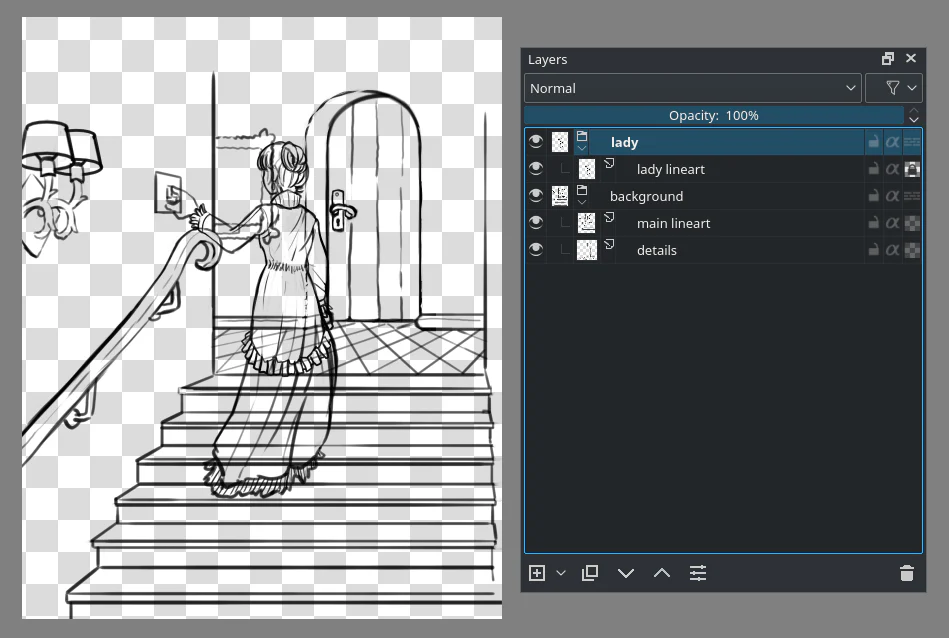
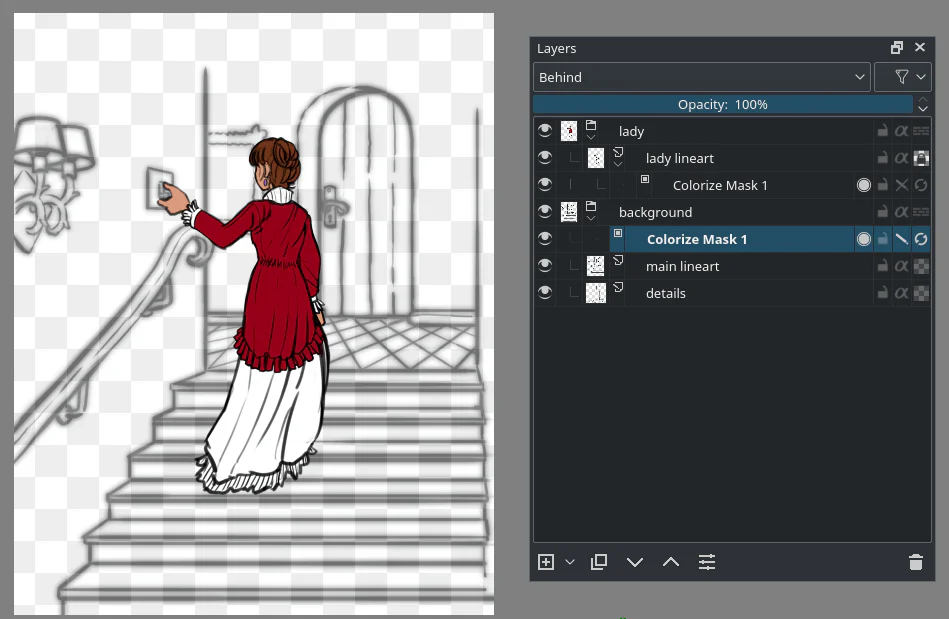
Layer is the most important cluster for digital artists. 图层 is read as túcéng. 图 means image, 层 means level, so it can be understood as "image level." When a tutorial says "新建图层," that's creating a new layer; "复制图层" is duplicating a layer; "删除图层" is deleting a layer; "重命名图层" is renaming a layer. These sentences appear in almost every drawing tutorial.
Krita distinguishes many types of layers. 颜料图层 is a paint layer used for painting pixels; 矢量图层 is a vector layer; 图层组 is a group. 蒙版 is a mask. When you need non-destructive adjustments, you'll encounter 透明度蒙版, 滤镜蒙版, and 变形蒙版. The phrase "非破坏性编辑" means non-destructive editing, a keyword well worth remembering when watching professional tutorials.
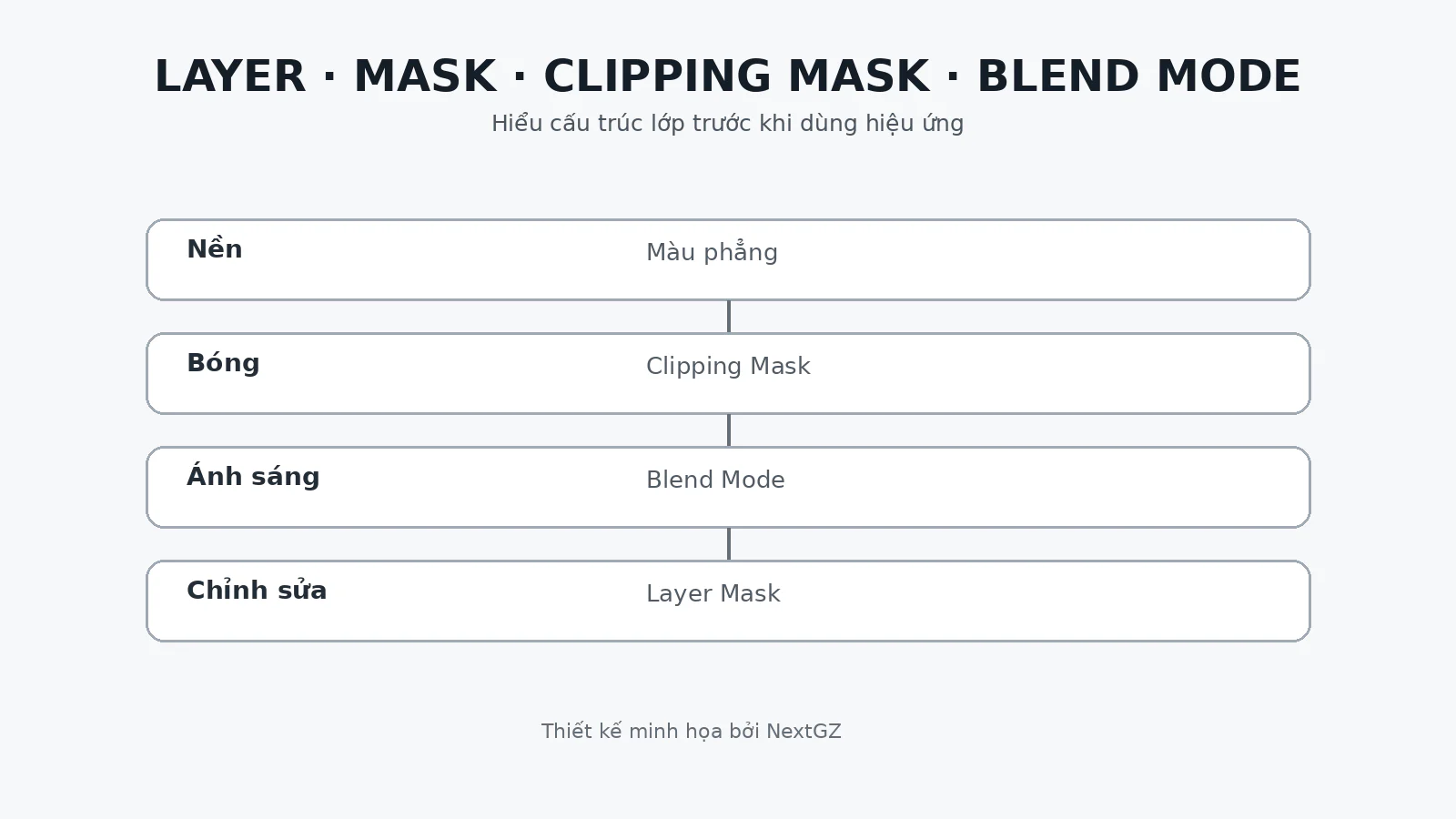
In Krita, the function closest to a clipping mask is called 继承透明度. An instructor might say "打开继承透明度" or "启用继承透明度," both meaning to enable Inherit Alpha. 锁定透明度 locks the alpha of the currently selected layer. These two phrases share the 透明度 part but differ in logic, so associate them with two separate actions on your test file.
| Chinese | Pinyin | Meaning in workflow | Recognition sentence |
|---|---|---|---|
| 图层 | túcéng | layer | 在 Krita 里找到"图层"。 |
| 颜料图层 | yánliào túcéng | paint layer | 在 Krita 里找到"颜料图层"。 |
| 矢量图层 | shǐliàng túcéng | vector layer | 在 Krita 里找到"矢量图层"。 |
| 图层组 | túcéng zǔ | layer group | 在 Krita 里找到"图层组"。 |
| 蒙版 | méngbǎn | mask | 在 Krita 里找到"蒙版"。 |
| 透明度蒙版 | tòumíngdù méngbǎn | transparency mask | 在 Krita 里找到"透明度蒙版"。 |
| 滤镜蒙版 | lǜjìng méngbǎn | filter mask | 在 Krita 里找到"滤镜蒙版"。 |
| 变形蒙版 | biànxíng méngbǎn | transform mask | 在 Krita 里找到"变形蒙版"。 |
| 选区蒙版 | xuǎnqū méngbǎn | selection mask | 在 Krita 里找到"选区蒙版"。 |
| 锁定透明度 | suǒdìng tòumíngdù | lock alpha | 在 Krita 里找到"锁定透明度"。 |
| 继承透明度 | jìchéng tòumíngdù | inherit alpha/clipping | 在 Krita 里找到"继承透明度"。 |
| 混合模式 | hùnhé móshì | blend mode | 在 Krita 里找到"混合模式"。 |
| 不透明度 | bù tòumíngdù | opacity | 在 Krita 里找到"不透明度"。 |
| 显示 | xiǎnshì | show | 在 Krita 里找到"显示"。 |
| 隐藏 | yǐncáng | hide | 在 Krita 里找到"隐藏"。 |
| 锁定 | suǒdìng | lock | 在 Krita 里找到"锁定"。 |
| 重命名 | chóng mìngmíng | rename | 在 Krita 里找到"重命名"。 |
| 复制图层 | fùzhì túcéng | duplicate layer | 在 Krita 里找到"复制图层"。 |
| 向下合并 | xiàng xià hébìng | merge down | 在 Krita 里找到"向下合并"。 |
| 合并可见图层 | hébìng kějiàn túcéng | merge visible layers | 在 Krita 里找到"合并可见图层"。 |
Brush and stroke group
画笔 is the common term for brush, while 笔刷 is also widely used in the software community. Therefore, Brush Preset may appear as 笔刷预设. 笔刷引擎 is the brush engine, i.e., the system that determines how a brush creates marks, reacts to pressure, and handles texture. When reading documentation or watching advanced videos, the word 引擎 often appears in the brush configuration section.
The parameters you need to react to quickly include 大小, 不透明度, 流量, 间距, 旋转, 压感, and 倾斜. The sentence pattern "把笔刷大小调小一点" means to reduce the brush size a bit. "降低不透明度" is to lower opacity. "增加流量" is to increase flow. "打开压感" is to enable pressure sensitivity. You don't need to translate the whole sentence; just catch the increase–decrease verb and the parameter name.
Two words that often cause confusion are 不透明度 and 流量. Opacity limits the maximum opacity of a stroke, while flow controls the amount of color accumulated during the stroke. When a tutorial says "低流量慢慢叠色," it means using low flow to build up color slowly. This is a very common sentence in skin painting, color blending, and light rendering.
| Chinese | Pinyin | Meaning in workflow | Recognition sentence |
|---|---|---|---|
| 画笔 | huàbǐ | brush | 在 Krita 里找到"画笔"。 |
| 笔刷预设 | bǐshuā yùshè | brush preset | 在 Krita 里找到"笔刷预设"。 |
| 笔刷引擎 | bǐshuā yǐnqíng | brush engine | 在 Krita 里找到"笔刷引擎"。 |
| 大小 | dàxiǎo | size |
Đánh giá bài viết
More from author
 Unity
UnityUnity 6000.5.6f1: Android SDK 37, Physics/Netcode và loạt fix indie team nên kiểm tra

 Indie Game
Tukoni: Forest Keepers sắp phát hành: Từ Prologue miễn phí đến một game cozy hoàn chỉnh
 Godot
GodotGodot Community Poll 2026 còn mở: Indie dev nên phản hồi gì để tác động đúng vào priority list?

 Unreal Engine
Unreal Engine 5.8 Incremental Cooking + Zenserver: Indie team nên thiết kế vòng lặp build ra sao?
You might also like
 Từ vựng theo chủ đề
Đọc Giao Diện 画世界Pro Bằng Tiếng Trung: 100 Thuật Ngữ Brush, Layer, Filter Và Export
 Công cụ & Phần mềm
Hướng dẫn Clipping Mask, Alpha Lock và Layer Mask khi tô da anime trong Procreate
 Công cụ & Phần mềm
Dựng lineart anime trên ibisPaint X: Stabilizer & Vector Layer
 Tiếng Trung cho Artist

Bình luận
0 bình luận
Đăng nhập để tham gia thảo luận cùng cộng đồng!
Đăng nhập ngayĐang tải bình luận...